How to Get a List of All Team IDs in Your FPL Mini-League
To get every FPL team ID in your mini-league, open the league on FPL Ranker, sign in, and use the Ambassador tab — it lists the team ID for every manager in the league and exports the whole roster as a CSV. Doing it manually means opening each manager from the official standings page and reading the number out of the URL, one at a time.
What an FPL team ID is
Every Fantasy Premier League squad has a permanent numeric team ID, sometimes called an entry ID or manager ID. It appears in the URL of any manager's team page: fantasy.premierleague.com/entry/1234567/event/1 — the 1234567 is the team ID.
The ID is public. It is how the official Fantasy site links to a squad, and it is what third-party tools ask for when they load someone's team. It is not a password and it grants nobody access to your account — knowing your ID lets someone view the same public squad page that the official league table already links to.
The manual method: one ID at a time
Open your mini-league on the official Fantasy Premier League site, go to the Standings tab, and click a manager's team name. That opens their squad page, and the number in the URL after /entry/ is their team ID. Copy it, go back, and repeat for the next manager.
This works, but the official standings page never shows the IDs as a list — so a 20-manager league means 20 round trips through the URL bar, and there is no export. That is the whole reason this question gets asked.
The fast method: the Ambassador tab
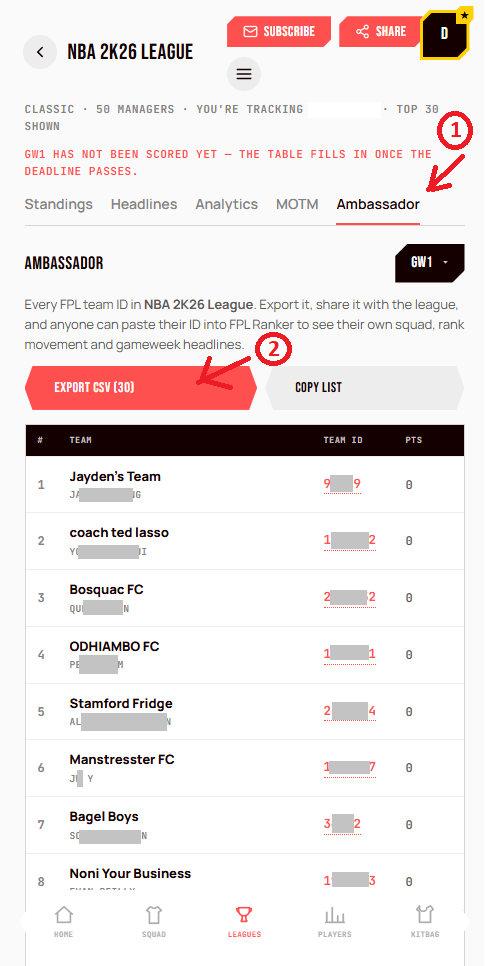
Open your league on FPL Ranker, sign in with your email (magic link — no password), and select the Ambassador tab. It lists every manager in the league with their team name, manager name, team ID and total points, in rank order, on one screen.
Each ID links straight to that manager's official Fantasy squad page, and Export CSV downloads the whole roster — rank, team, manager, team ID, total points, gameweek points, the official FPL link and an FPL Ranker link for each manager. Copy list puts the same roster on your clipboard for a group chat.
It is sign-in gated on purpose. A roster of manager names and IDs should not be bulk-scrapeable by anyone who happens to know a league code, so exporting is tied to a real account.
What to do with the list
The common use is comparison. With every ID in one place you can pull up any rival's squad, see their captain, and check their transfers without hunting through the official table each week.
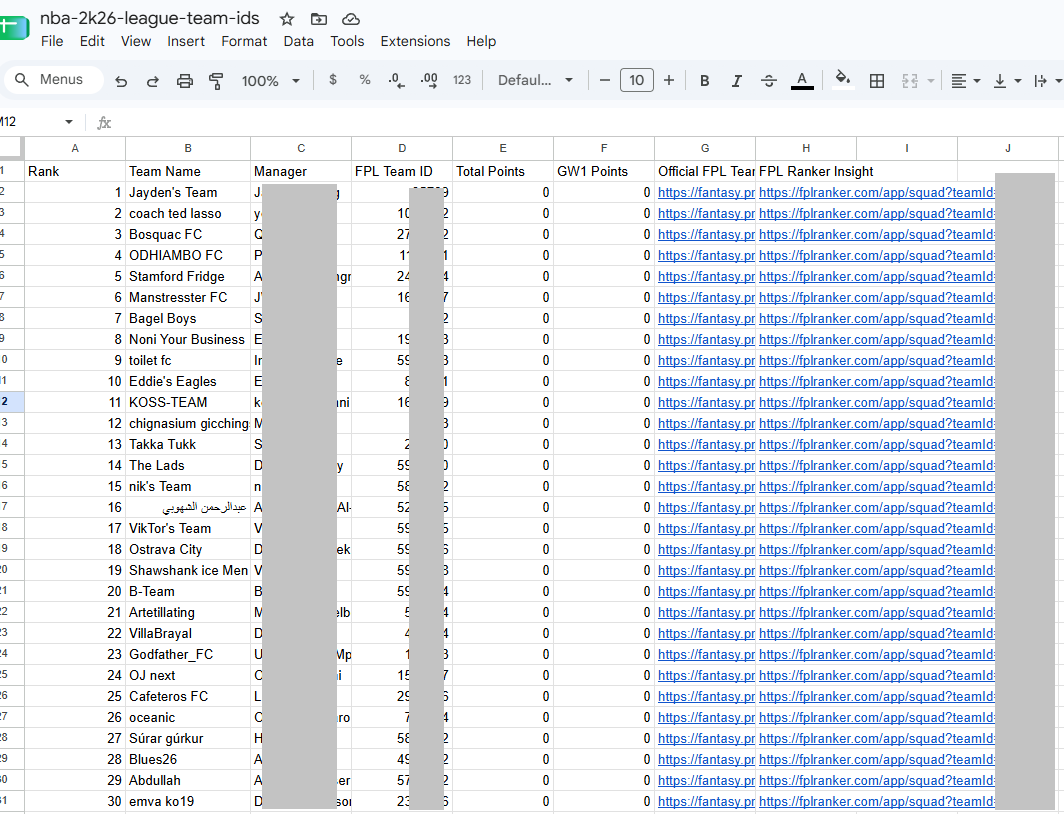
The export opens straight in Google Sheets, Excel or Numbers. Every row is one manager — rank, team name, manager name, FPL team ID, total points, gameweek points, a link to their official Fantasy squad and a link to their FPL Ranker page — so you can sort it, filter it, or paste a single column into whatever tool you use next.
The other use is the one the tab is named after. Share the CSV in your league chat so everyone can paste their own ID into a tool and see their season — rank movement, gameweek headlines, and where they actually gained and lost ground. A mini-league is more fun when everyone can see the story, not just the table.
How does your own squad look?
Enter your team ID for your projected points, captaincy verdict and mini-league position — the same model behind this article, run against your 15.
Don’t know it? Find your team ID ›
FPL Gameweek 2 Captain Picks and Transfer Targets 2026/27
FPL GW1 Template & World Cup Fatigue Guide 2026/27